Create a PAT with a proxy user
To connect the application with Altru, you are required to create a proxy user in Altru using a personal access token (PAT). This is required to access Altru programmatically and ensures appropriate login credentials to support data security and avoid risk of data breaches. This user account is independent of your existing accounts.
Step 1: Login to Altru
- Login to your Altru.
- Click on “Administration”.
- Click on “Application users”.
- Click on the “Add proxy user” button.
- A dialog appears to create a new proxy user.
Step 2: Create a proxy user
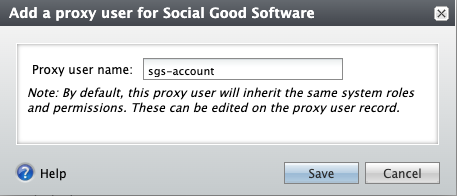
- Type in the name of the account.
- The “Proxy username” is “sgs-account”.
- Click on “Save”.
- Search for the user “sgs-account”.
- Click on the name “sgs-account”.
- Remove all the system roles not required.
- Assign the following roles to the account.
Step 3: Assign roles
- Attribute Categories: This is a system role that define and store special information about a wide variety of record types. Required for Checkouts.
- Code Tables: This is a system role that View and edit entries in code tables. Required for Email Designer.
- Development Data Entry: This role provides read and write access for constituents and memberships. Required for Checkouts, Data Bridge, Digital Membership Cards, and Member Portal.
- Group Sales Coordinator: This role attaches note for group sales. Required for Email Designer and Link2Pay.
- Blackbaud Built-In AppFX System User Role: This role is for Link2Pay. Required for Link2Pay.
- Guest Services Manager: This role provides lookup details for a ticket and un-scan the ticket with the Ticket Scanner.
- Marketing Manager: This is a system role that runs queries on behalf of the organization. Required for Checkouts, Email Campaigns, Ticket Scanner, Member Portal, and Data Bridge.
- Ticket Seller: This is a system role that reads and writes access for tickets. Required for Ticket Scanner and Digital eTickets.
- Web Forms Administrator: This is a system role that generates links for the calendar. Required for Checkouts.
If unable to add the roles to the proxy account, click on the “Proxy owner” and assign the roles to the user first, then assign roles to the proxy user.
Altru, as of this writing, does not allow defining custom roles. If needed, contact your Account Executive at Blackbaud to define and create a new role for you.
Step 4: Personal access token
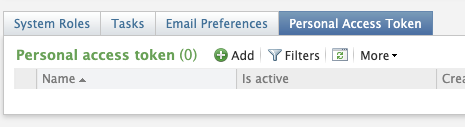
- Click on the “Personal Access Token” tab.
- Click on “Add”.
- Enter the name “socialgood”.
- Copy the personal token.
- Click on “save”
Obtain your account name and token to use with the integration. Avoid assigning the System Administrator role to this account. Do not share your newly created account with anyone other than the application.
Altru requires you to create a personal access token every 12 months. Ensure you comply with Altru’s policy and keep your token up to date by creating a new token every 12 months.
Did this answer your question?