Requirements
Before getting started with this guide please make sure you meet the following requirements.
- You have an Altru account with permission to create ODATA queries
Once you have the query created you will be able to set up the query with the Social Good application.
How to create a ticketed program query
Step 1: Opening the information library
Go to your instance of Altru and log in with your username and password.
Once you have logged in click on the “Analysis” tab on the navigation bar.
Click on the “Information Library” section sub-menu selection to open the query builder.
Step 2: Creating a new ad-hoc query
Click on the “Add an ad-hoc query” button to start the process of creating a new query
Select the “Sales Order” query type.
Let’s first start with the “Include records where:”
Sales Order ItemSales Order Item TicketTicketsStatus is equal to Active (optional)
and Sales Order ItemSales Order Item TicketTicketsTicket number is not blank (*required)
and ConstituentEmail AddressesPrimary email address is equal to Yes (optional)and Sales Order ItemSales Order Item TicketProgram EventsStart date is today (*optional)
Feel free to change or adjust the query to your organization’s needs. For example, if your tickets are valid for an entire year you can use the “This calendar year” option.
Secondly let us output the fields “Results fields to display:” we will need.
Lookup ID (optional)
Sales Order ItemSales Order Item TicketProgram EventsName (optional)
ConstituentEmail AddressesEmail address (optional)
Sales Order ItemSales Order Item TicketTicketsTicket number (*required)Sales Order ItemSales Order Item TicketTicketsSystem record ID (*required)
The result fields you choose to display will be shown in the application and can be used for looking up a constituent based on the output of the query. You just have to make sure you include them in the results fields to display and they will automatically show up in the mobile app.
Step 3: Preview and save query
Once you have finished creating your query it’s time to preview the data and save the query.
Click on the “Preview Results” tab on the top navigation of the query builder
At this point you want to verify you are getting valid data and once you are happy with the output of the query you are ready to move on to the next step of saving the query.
Click on “Set save options”
Now it’s time to save the query. Give your query a name.
Tickets Sold Today | Barcode Scanner
Go to the “Options for using this query” section and uncheck the “Suppress duplicate rows” option.
Lastly, make sure the Social Good app can run this query by giving it the right permissions.
Check the “Allow all users to run this query” option.
Now you are ready to save the query click on the “Save and close” option.
That’s all there is to create a query for the Barcodes Scanner app.
FAQ on barcode scanner
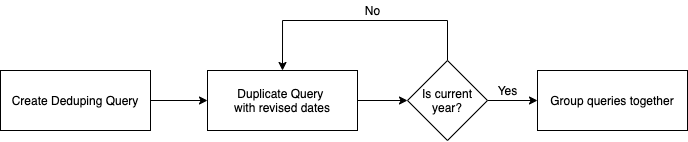
- Altru only supports 15,000 rows exported via ODATA links. If your query is larger than 15,000 rows you will need to create smaller queries with Altru by using date ranges. Example.